

A shopper types “stainless steel water bottle” into Amazon, scans the first few results, and clicks one with a small Sponsored label. Behind that click is Amazon PPC: a marketplace advertising system built for one very valuable moment, when someone is already close to buying.
So, what is Amazon PPC? It is short for pay-per-click; it lets you bid to place products in Amazon search results, on product detail pages, and, for certain formats, beyond Amazon itself. You don’t pay merely because the ad appears: you pay when a shopper clicks it. That sounds simple, but profitable advertising depends on much more than turning on a campaign. Your listing quality, bid, price, reviews, targeting, and margins all affect the outcome.
Used well, Amazon PPC can introduce a new product, protect your brand’s search real estate, uncover buyer language, and support organic growth. Used carelessly, it can burn through budget with impressive efficiency. Here’s how to understand the system before you spend your first dollar.
How Amazon PPC Works: Auctions, Placements, and Pay-Per-Click Costs
Amazon PPC uses a real-time auction system. When a shopper searches or visits a product page, Amazon decides which ads to show based on your bid, relevance, product eligibility, and other quality signals.
Winning the auction doesn’t mean paying your full bid. You pay only when someone clicks your ad, and your actual cost per click (CPC) depends on competing bids and auction conditions. CPCs can range from a few cents for low-competition keywords to several dollars in highly competitive categories.
Common Sponsored Products placements include:
- Top of search: prominent placements near the first organic results
- Rest of search: other placements within search results
- Product pages: ads shown on a product detail page, often beside or below competing items
Amazon may let you apply placement adjustments to increase bids for certain placements. Don’t assume top of search is automatically best, though. It often delivers strong conversion intent, but it can also be expensive. Compare CPC, conversion rate, and ACoS by placement before pushing harder.
One practical requirement is easy to overlook: advertising cannot rescue a poor listing. If inventory is thin, the Buy Box is unavailable, images are weak, or the offer is uncompetitive, clicks become expensive window-shopping.
Amazon PPC vs. Organic Sales: How Advertising Supports Product Ranking
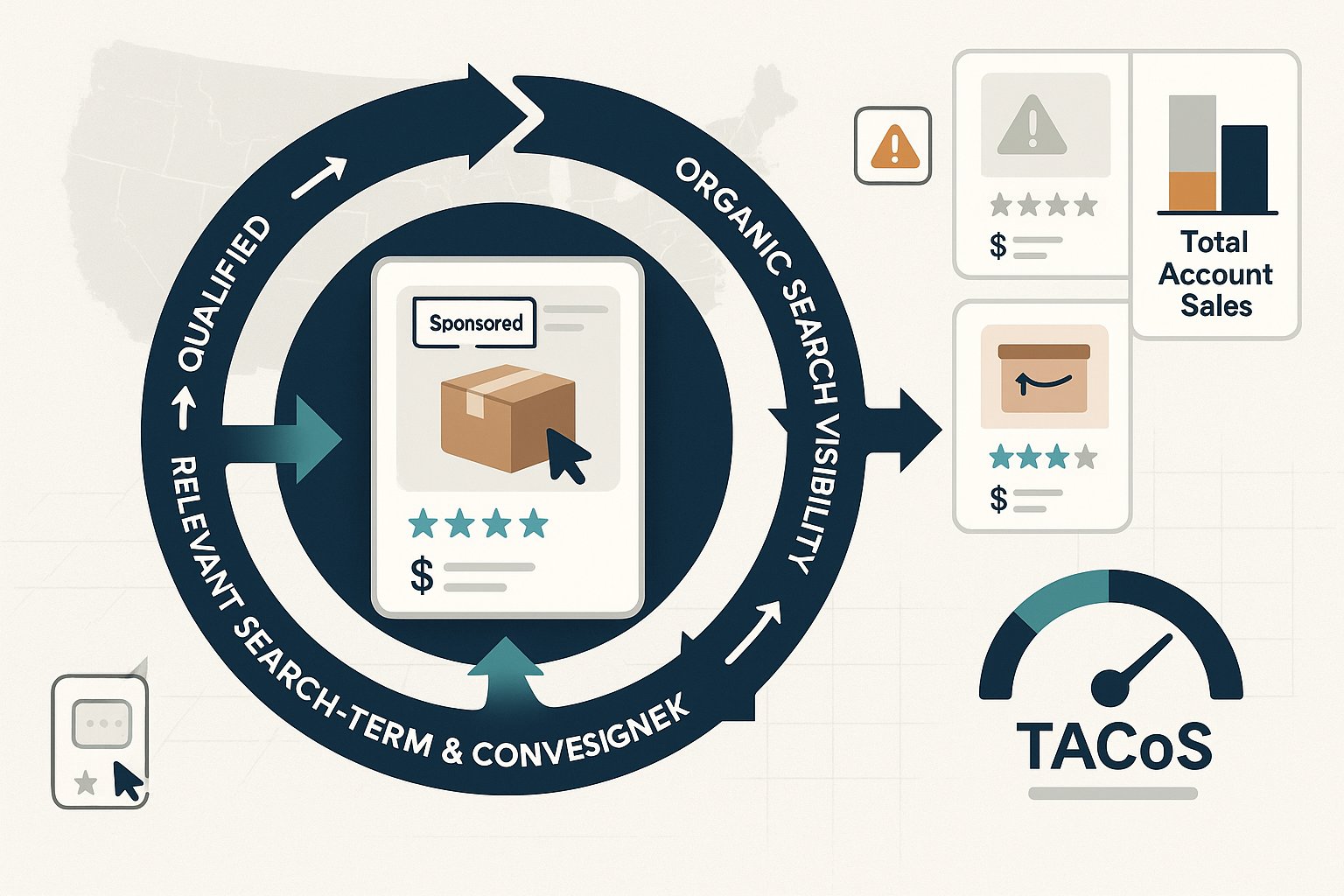
Organic sales come from unpaid visibility in Amazon search. While Amazon doesn’t reveal its exact ranking algorithm, one thing is clear: products that attract relevant clicks and convert into sales are more likely to perform well over time.
Amazon PPC helps put your product in front of shoppers before it earns strong organic visibility. When your ads convert on relevant keywords, you not only generate sales but also discover valuable search terms that can improve your listing and long-term SEO strategy.
However, PPC alone won’t improve rankings if your listing isn’t optimized. Sending paid traffic to a product with a weak title, poor images, low reviews, or uncompetitive pricing usually leads to expensive clicks instead of lasting growth.
Think of PPC and organic SEO as working together:
- Amazon SEO improves your listing’s relevance and conversion potential.
- Amazon PPC drives qualified traffic and uncovers valuable search-term data.
- Higher conversions strengthen overall sales performance, supporting long-term organic visibility.
- Optimized listings + effective PPC create a cycle that fuels both paid and organic growth.
Another important metric is TACoS (Total Advertising Cost of Sales). Unlike ACoS, which measures only ad-attributed sales, TACoS compares ad spend against your total sales. If your PPC spend increases but your overall and organic sales grow even faster, your advertising investment is likely paying off over the long term.
Amazon’s Main PPC Ad Types and When to Use Each
Amazon offers multiple ad formats, but beginners don’t need to use every format on day one. Start with the one that matches your immediate objective and account eligibility. Sponsored Products is usually the practical foundation because it connects an individual listing directly to high-intent searches.
Sponsored Products, Sponsored Brands, and Sponsored Display
Sponsored Products promote individual ASINs in search results and on product pages. They look similar to regular product listings, aside from the Sponsored label. You can target keywords or products and use automatic or manual targeting. For a product launch, keyword harvesting, everyday sales volume, and direct response testing, this is typically the first ad type to master.
Sponsored Brands can feature your logo, a custom headline, and several products, or send shoppers to a Store or landing page. They are especially useful when you’re registered as a brand and want to own more space for branded searches, introduce a product line, or cross-sell related items. They can build recognition, but measure whether the campaign produces efficient purchases, not just pleasant-looking impressions.
Sponsored Display uses product and audience-based targeting. Ads may appear on Amazon and, depending on the campaign and eligibility, on third-party sites and apps. Use it to reach shoppers viewing competitor products, retarget audiences who viewed your listings, or keep complementary products in front of relevant buyers.
There are other Amazon Advertising options, including video and demand-side capabilities, but these three sponsored ad types are the core PPC toolkit for most sellers. Nail listing conversion and Sponsored Products before expanding.
Keywords, Product Targeting, and Match Types Explained
Keyword targeting places ads in response to shopper searches. Start by thinking like a buyer, not like a catalog manager. A customer may search “leakproof gym bottle,” not the technical term printed on your packaging. Use Amazon’s suggested terms, your automatic-campaign search-term report, customer questions, and competitor listings to build a relevant list.
Manual keyword campaigns use three principal match types:
- Broad match reaches related variations and shopper queries. It’s useful for discovery, but can spend broadly.
- Phrase match requires the query to include your keyword phrase in the same order, with possible words before or after it.
- Exact match provides the most control, serving for close variations of the targeted term. It is often where proven, high-converting queries belong.
Product targeting is different: instead of targeting a search phrase, you target specific ASINs or a category. Target competitor products when your offer has a credible reason to win, better price, stronger reviews, a meaningful feature, or a complementary use case. You can also target your own ASINs to defend product pages or direct shoppers to a better variation.
The overlooked lever is negative targeting. Add negative keywords or negative product targets when a query is irrelevant or repeatedly drains spend without a sale. For example, a premium insulated bottle should probably block “plastic disposable water bottle.” Negatives don’t make campaigns glamorous, but they prevent your budget from wandering off.
Keep targets organized by intent. Mixing dozens of unrelated terms in one ad group makes it difficult to see what is actually earning its keep.
Setting a Budget, Bids, and a Profitable Target ACoS
Your daily budget controls how much a campaign can spend in a day: your bid controls how aggressively it competes for each click. Set both according to economics, not a vague desire to “get more sales.”
ACoS, or advertising cost of sales, is calculated as:
Ad spend ÷ ad-attributed sales × 100
If you spend $20 to generate $100 in attributed sales, your ACoS is 20%. RoAS is the inverse expression: $100 divided by $20 equals 5x return on ad spend.
Your break-even ACoS is approximately your pre-advertising contribution margin. Say a $30 product leaves $9 after Amazon fees, product cost, fulfillment, and other variable costs. Your rough break-even ACoS is 30%. Spending above that may still be intentional during a launch, but it is not immediately profitable.
Set a lower target ACoS when you need profitability now. Accept a higher target when launching, clearing inventory, or building search visibility, provided you have a time limit and a reason. Don’t blindly use a universal 10% or 15% target: category margins vary too much.
For bids, begin near Amazon’s suggested range only if it fits your economics. Raise bids gradually on targets that convert profitably and lack enough impressions. Reduce bids on expensive, non-converting targets. A campaign budget should be large enough to gather data, but not so large that one messy setup can do serious damage before you notice.
Also consider inventory. There is little sense accelerating ads for a product that will stock out next week.
How to Launch Your First Amazon PPC Campaign
Before opening Campaign Manager, prepare the product detail page. Confirm the listing has a clear main image, accurate title, persuasive bullets, relevant keywords, competitive pricing, stock, and a realistic review position in its category. PPC gets shoppers to the page: the listing closes the sale.
In Seller Central, go to Advertising and open Campaign Manager, then choose Create campaign. For a first campaign, select Sponsored Products, choose the marketplace and product, set a daily budget, pick a start date, and establish an initial bid strategy. Naming conventions matter more than they seem. A name such as SP | Bottle | Auto | US | Launch is much easier to manage three months later.
A clean setup usually advertises one closely related product or variation group per campaign. That makes budget control and reporting less murky. Avoid placing an entire unrelated catalog into one campaign just because it is faster today.
Automatic vs. Manual Campaigns: A Simple Beginner Structure
An automatic campaign lets Amazon select search and product targets based on your listing. It is valuable for discovery: you may uncover real shopper terms you would never have guessed. Start it with a controlled budget and inspect the search-term report regularly.
A manual campaign gives you direct control over keywords, match types, product targets, and bids. Start with a small number of highly relevant terms instead of pasting in hundreds of suggestions.
A practical beginner structure is:
- One automatic Sponsored Products campaign for discovery.
- One manual exact campaign for proven, high-intent terms.
- One manual phrase or broad campaign for controlled expansion.
- Optionally, one product-targeting campaign for relevant competitor and complementary ASINs.
When a search term from the auto or discovery campaign produces sales at an acceptable ACoS, move it into manual exact with a deliberate bid. Then add it as a negative exact in the discovery campaign if you want cleaner reporting and tighter control. Let campaigns collect enough clicks and time to reveal a pattern: changing everything daily is usually just expensive fidgeting.
How to Measure and Optimize Amazon PPC Performance
Optimization is a repeating process: review data, identify a specific issue, make a measured adjustment, and check the result. Don’t judge a campaign solely by sales. A campaign can produce revenue and still lose money: it can also have a high launch-phase ACoS while supporting a strategically important product.
Track these core metrics:
- Impressions: how often the ad was shown
- CTR: clicks divided by impressions: a weak CTR can point to poor relevance, a weak image, price resistance, or an unappealing offer
- CPC: what each visit costs
- Conversion rate: orders divided by clicks: this tests the listing and offer after the click
- ACoS and RoAS: direct ad efficiency
- TACoS: ad spend against total sales, useful for understanding ad dependence
Use a sensible review rhythm. Check budgets and major issues every few days, but make bid decisions after enough data has accumulated for your sales cycle. A target with 12 clicks and no order tells you far less than one with 80 clicks and no order.
Typical actions are straightforward: increase bids modestly for profitable targets that need more visibility: lower bids for targets with costly sales: pause targets with sustained spend and no viable return: and add negatives for irrelevant queries. Search-term reports are your best source of optimization ideas.
Finally, diagnose the right problem. Low impressions may require a higher bid, broader targeting, or better eligibility. Plenty of clicks but poor conversion often calls for listing work, images, price, coupons, reviews, shipping promise, not a bigger bid. PPC management is less about finding a magic setting than making disciplined decisions from the evidence.
Conclusion
Understanding what is Amazon PPC is the first step toward building a profitable advertising strategy on Amazon. It isn’t just about paying for clicks it’s about using the right keywords, bids, listings, and optimization techniques to turn shopper interest into sales.
Start with Sponsored Products, keep your campaigns simple, and optimize based on real performance data. Combined with strong listings, smart inventory management, and ongoing refinement, Amazon PPC can help increase visibility, drive conversions, and support long-term organic growth.
Amazon PPC Frequently Asked Questions
What is Amazon PPC and how does it work?
Amazon PPC (Pay-Per-Click) is an auction-based advertising system where sellers bid on keywords or products to display ads on Amazon. Sellers pay only when shoppers click their ads, with placements including search results and product detail pages.
What are the main types of Amazon PPC ads and their purposes?
The three main Amazon PPC ad types are Sponsored Products, which promote individual listings; Sponsored Brands, featuring a logo and multiple products for brand awareness; and Sponsored Display, which retargets audiences both on and off Amazon.
How does Amazon PPC support organic sales and product ranking?
Amazon PPC drives immediate visibility and sales, signaling relevance to Amazon’s algorithm. Strong ad performance and optimized listings can improve organic rankings over time, creating a virtuous cycle between paid and organic growth.
What is ACoS and how do I use it to manage my PPC campaigns?
ACoS (Advertising Cost of Sales) measures ad spend divided by revenue from ads. A lower ACoS than your profit margin indicates profitability. Setting realistic target ACoS based on your costs helps manage bids and budgets for effective campaigns.
How should beginners launch their first Amazon PPC campaign?
Start with one Sponsored Products campaign focusing on a well-optimized product listing, set a daily budget, and use automatic targeting to discover keywords. After gathering data, add manual campaigns with exact and phrase match keywords for better control.
Why is keyword targeting important in Amazon PPC and what match types exist?
Keyword targeting shows ads for relevant shopper searches, increasing relevance and conversion. Match types include broad (related queries), phrase (exact phrase within query), and exact (precise match), allowing sellers to balance discovery and control.


